
Quick Start
Nội dung này hiện chưa có sẵn bằng ngôn ngữ của bạn.
This will quickly introduce you to the basics of the plugin, by creating a simple leaderboard.
Add a Top Holder
Section titled “Add a Top Holder”The unit that stores and manages the leaderboard data is called a Top Holder. Inside the Top Holder, you can define
a Value Provider, which is responsible for providing the value of each entry in the leaderboard.
We will start by creating a Top Holder named jump and defining a Value Provider to count the number of times the
player jumps. The Value Provider we will use is called Statistic Provider.
Open the config.yml file from the plugin’s folder (plugins/Topper/config.yml), head to the holders section, and
add the following configuration:
holders: jump: # The name of the Top Holder type: statistic # The type of the Value Provider, which in this case is a Statistic Provider statistic: jump # The name of the statistic that will be used to count the number of jumpsOpen the config.json file from the mod’s folder (config/topper/config.json), head to the holders section, and add
the following configuration:
{ "holders": { "jump": { // The name of the Top Holder "type": "statistic", // The type of the Value Provider, which in this case is a Statistic Provider "statistic": "minecraft:jump" // The name of the statistic that will be used to count the number of jumps } }}That is all you need to do, now the plugin is ready to start counting the number of jumps.
Open your server terminal and type /reloadtop to apply the changes.
Display the Top Holder
Section titled “Display the Top Holder”There are several ways to display the leaderboard of a Top Holder. In this case, we will simply display the top 10
players in the chat.
To do this, type the following command:
/gettop jump 10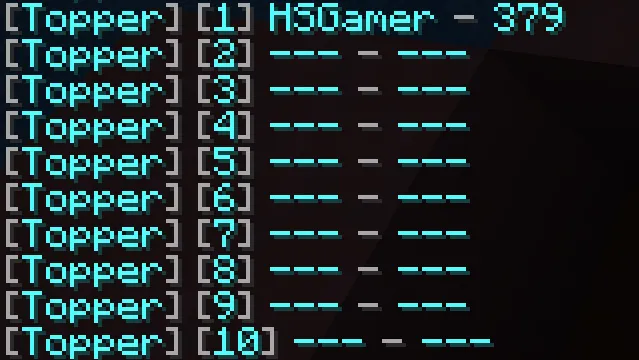
Add another Top Holder
Section titled “Add another Top Holder”Now, let’s add another Top Holder to show the amount of diamond ores a player has mined.
Open the config.yml file from the plugin’s folder (plugins/Topper/config.yml), head to the holders section, and
add the following configuration:
holders: jump: type: statistic statistic: jump mine: type: statistic statistic: mine_block material: diamond_oremine_block needs a block material to work. Hence, we added the material field to specify the block material, which
in this case is diamond_ore.
Open the config.json file from the mod’s folder (config/topper/config.json), head to the holders section, and add
the following configuration:
{ "holders": { "jump": { "type": "statistic", "statistic": "minecraft:jump" }, "mine": { // The name of the Top Holder "type": "statistic", // The type of the Top Holder "statistic-type": "minecraft:mined", // The type of the statistic "statistic": "minecraft:diamond_ore" // The name of the statistic } }}Open your server terminal and type /reloadtop to apply the changes.
Now, you can display the top 10 players who have mined the most diamond ores by typing the following command:
/gettop mine 10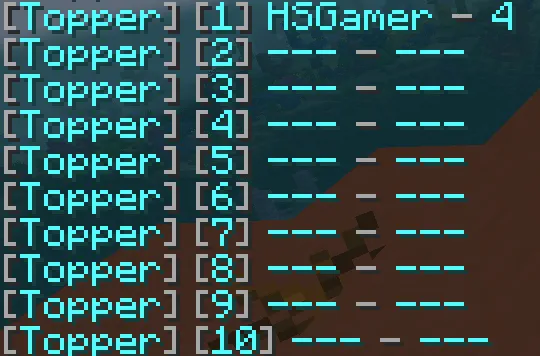
What’s next?
Section titled “What’s next?”This is just the beginning. You can check the other pages in the documentation to learn more about the plugin and its features. There could be something that you might find interesting for your server.
Happy building! 🚀